


English README is 👉 here.
- 👋 SecureQR 를 쉽게 스캔하기 위한 Android 라이브러리입니다!
- 생성한 보안 QR 코드의 인식 결과를 전달 받은 후, 서버로 복호화를 요청하고 복호화된 원본 URL을 쉽게 추출할 수 있도록 도와줍니다.
Java==8Android>=7.0(Platform Level 24)
// Project gradle
allprojects {
    repositories {
       ...
        maven { url "https://jitpack.io" }
    }
}
// Module gradle
dependencies {
    ...
    implementation 'com.journeyapps:zxing-android-embedded:$ZxingVersion'       // 4.2.0
    implementation 'com.squareup.retrofit2:retrofit:$RetrofitVersion'           // 2.9.0
    implementation 'com.github.SoTree17:SecureQR-module-android:0.0.8'          // check for version
}
com/
├─ secureQR/
│  ├─ data/
│  │  ├─ RequestDTO.java
│  │  ├─ ResponseUrl.java
│  ├─ module/
│  │  ├─ Communicator.java
│  │  ├─ SecureQR.java
│  ├─ retrofit/
│  │  ├─ RetrofitAPI.java
사용 예제를 확인하려면 클릭해주세요! 👉 here.
public class ResultActivity extends AppCompatActivity {
        @Override
        protected void onCreate(Bundle savedInstanceState) {
            super.onCreate(savedInstanceState);
            setContentView(R.layout.activity_result);

            setContents();
        }

        private void setContents() {
            Intent intent = getIntent();
            url = intent.getStringExtra("url");
            int isAuthQR = intent.getIntExtra("isAuthQR", 0);

            if (isAuthQR == SecureQR.IsAuthQR) {
                authMessage.setText("보안 QR 코드 입니다.");
            } else {
                authMessage.setText("보안 QR 코드가 아닙니다.");
            }

            urlText.setText(url);
        }
}- 서버에서 해독된 최종 URL을 얻기 위해선 key가
"url"인 StringExtra에서 추출해야 합니다. - 스캔한 QR코드가 SecureQR에 해당하는지 여부를 확인하기 위해 추가적인 정보를 사용할 수 있습니다.
final String authURL = "http://yourServerURL";
final int QR_RequestCode = 12345;  // Any number what you want
final String packageName = "com.your.package";
final String activityName = "ResultActivity";

    @Override
    protected void onCreate(Bundle savedInstanceState) {
        super.onCreate(savedInstanceState);
        setContentView(R.layout.activity_main);

        // initialize
        SecureQR secureQR = new SecureQR(context, packageName, activityName, authURL);
    }
- QR코드를 스캔하는 activity의 부모 activity에서 SecureQR 클래스의 인스턴스를 생성합니다.
@Override
    protected void onActivityResult(int requestCode, int resultCode, @Nullable Intent data) {
        IntentResult result = IntentIntegrator.parseActivityResult(resultCode, data);

        // process result of scanned data with Zxing library
        secureQR.processResult(result);

        super.onActivityResult(requestCode, resultCode, data);
}- ZXing에서 스캔 후 생성된 IntentResult 타입의 데이터를 processResult() 메소드로 처리합니다.
- processResult() 메소드는 자동으로 SecureQR 객체의 Result Activity(위에서 사용자가 생성한 activity) 를 시작합니다.
SecureQR 클래스 생성자의 parameter
| Type | Name | Description |
|---|---|---|
| Context | context | Application Context. |
| String | packageName | SecureQR의 ResultActivity로 사용할 액티비티의 패키지 이름. (경로의 마지막 '.' 생략) |
| String | activityName | SecureQR의 ResultActivity 이름. |
| String | authURL | (반드시 확인 필요!) 인증 서버의 (base) URL |
Error type
SecureQR의 에러 종류
| Type | Name | Description |
|---|---|---|
| String | FAIL_DECRYPT | 복호화 실패 |
| String | FAIL_DATA | 원본 데이터와 다름 |
| String | FAIL_HASH | 해시 값이 다름 |
| String | FAIL_INDEX | 인덱스 오류 |
Interface Communicator
SecureQR의 interface(Communicator)를 구현함으로써, SoTree의 Secure QR코드 처리 과정을 커스터마이징 하실 수 있습니다.
| Type | Method | Description |
|---|---|---|
| void | setAuthURL(String authURL) | 인증 서버의 (base) URL을 지정합니다. |
| String | getAuthURL() | 인증 서버의 (base) URL를 반환합니다. |
| void | processResult(IntentResult result) | ZXing을 이용해 QR코드를 스캔할 결과를 처리합니다. |
| void | requestPOST(RequestDTO data) | Retrofit을 이용해 auth 서버에 RequestDTO 객체 형태의 POST를 요청합니다. |
| boolean | isJSON(String s) | 문자열이 JSON 형식인지 확인합니다. |
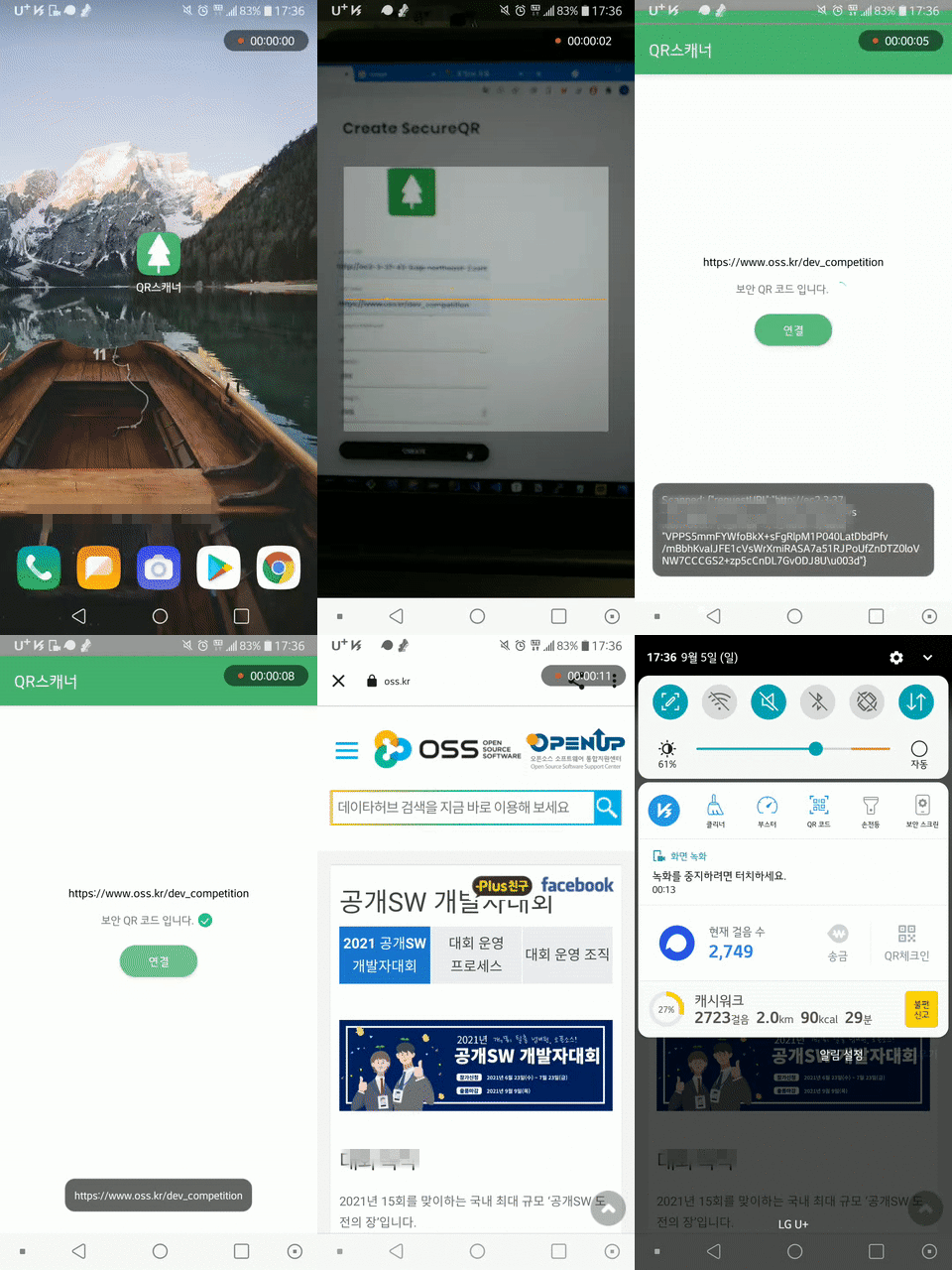
- 자세한 소스 코드는 👉 여기서
Bugs are tracked as GitHub issues.
Create an issue on this repository and if possible, please provide the following information.
- Use a clear and descriptive title
- Describe the exact steps which reproduce the problem
- Include screenshots and animated GIFs
Enhancement suggestions are tracked as GitHub issues.
Create an issue on this repository and if possible, please provide the following information.
- Describe the current behavior and explain which behavior you expected to see instead and why
- Include screenshots and animated GIFs
- Explain why this enhancement would be useful
A Pull Requests (PR) is the step where you submit patches to this repository.
(e.g. adding features, renaming a variable for clarity, translating into a new language)
If you're not familiar with pull requests, you can follow these steps.
- Fork this project and clone your fork
git clone https://github.com/<user-name>/secureQR-module-android.git
cd secureQR-module-android
- Create a new topic branch (off the main project development branch) to contain your feature, change, or fix
git checkout -b <topic-branch-name>
git pull
- Developing a new feature
- Push the feature to your fork
git push origin <topic-branch-name>
- Open a Pull Requests with a description
| Component | Version | Homepage | License |
|---|---|---|---|
| Retrofit | 2.9.0 | https://square.github.io/retrofit/ | Apache-2.0 License |
| Zxing | 4.2.0 | https://github.com/zxing/zxing | Apache-2.0 License |
| Gson | 2.9.0 | https://github.com/google/gson | Apache-2.0 License |