



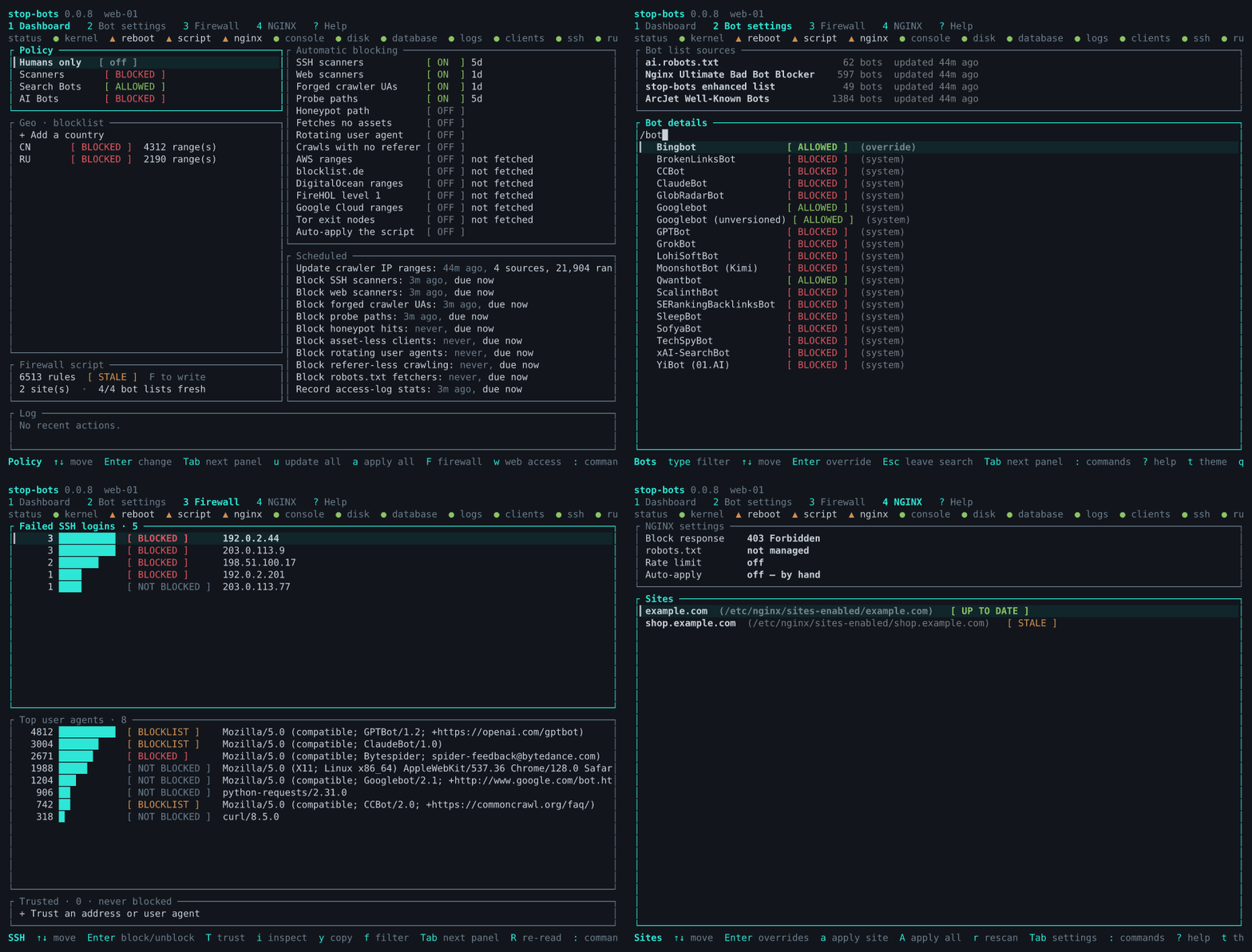
A TUI and a CLI that help you configure your server to stop bad bots without hiding behind a CDN. It is a fancy UI for your existing web server (nginx or Apache) and your firewall (nftables or iptables). For those of us that don't want to hide behind Cloudflare and give one company the keys to all kingdoms.
It protects you in two ways:
- Preventative - It downloads known bot lists and IP ranges and blocks them. I particularly recommend using Geo-blocking. For private servers, you can use an allowlist and block more than 90% of all attacks.
- Responsive - It monitors access logs and detects attackers and kicks them out. Note that this means a few packets will reach your server before they are detected, but at least it will stop them from escalating.
It tries to keep you from doing something self-destructive. You will always see what changes
first before you apply it, and you can use the --dry-run flag for extra safety. But I suspect
eventually you will want to enable auto-apply, for convenience. Because of this, the app also tries
not to lock you out. IP addresses with successful SSH logins are never blocked, webserver configs
are always tested before application and it tries to recognize apps running behind HTTP proxies and
adapts the dynamic detection rules to the apps.
Big red button: sudo stop-bots uninstall all
The rest of this readme was written by the AI. Feel free to ask your own AI to summarize it, I won't mind.
Installing starts nothing, and nothing is written until you apply. On the first apply, with the settings a new database starts with:
- Blocked by user agent: the Scanner and AI crawler categories. Search engines are allowed.
- Watching the logs: six detectors are on: SSH scanners, web scanners, forged crawlers, probes for secrets, injection attempts and login brute force. The rest are off (see From your logs).
- Blocked by address: nothing yet. Countries, reputation feeds and hosting providers are all off until you turn them on, so the firewall starts with only what the detectors find.
And this is what gets written where:
| What | Where |
|---|---|
| The blocking rule | inside each site's server block, between # BEGIN stop-bots and # END stop-bots |
Files the rule needs, when a setting needs one (robots.txt, rate limiting) |
/etc/stop-bots/nginx/ and NGINX's conf.d (for Apache, /etc/stop-bots/apache/ and conf-enabled) |
| The firewall script | /etc/stop-bots/firewall.next.nft (or .next.sh for iptables), copied to firewall.nft once applied; it only touches its own inet stop_bots table |
| Settings, blocks and why each exists | /var/lib/stop-bots/db.sqlite3 |
Here is sudo stop-bots batch --dry-run --diff on a fresh database and a one-site NGINX,
trimmed (the real user-agent pattern is a few hundred names long):
Dry run: nothing is downloaded, scanned, written, applied or recorded. Against the database as it is, `batch` would:
NGINX: 1 file(s) would change:
  /etc/nginx/sites-enabled/example.com
Firewall (nftables): 0 rule(s), 0 kernel entries; no applied script at /etc/stop-bots/firewall.nft yet, so all of it is new
lockout check passed: the SSH log was read, and no connected client would be blocked
would write 0 rule(s) to /etc/stop-bots/firewall.next.nft; not applied — review it, then apply it (“Apply everything” or `stop-bots render-firewall --apply`)
--- /etc/nginx/sites-enabled/example.com
+++ /etc/nginx/sites-enabled/example.com
@@ -1,4 +1,10 @@
 server {
+    # BEGIN stop-bots (DO NOT EDIT)
+    if ($http_user_agent ~* "AgentReadinessScanner|AIScan|ArgusScanner|…|xAI-Grok|zmap-proxy-probe") {
+        return 403;
+    }
+    # END stop-bots
+
     listen 443 ssl;
     server_name example.com;
     root /var/www/example.com;
--- /etc/stop-bots/firewall.nft (does not exist)
+++ /etc/stop-bots/firewall.next.nft
@@ -0,0 +1,29 @@
+#!/usr/sbin/nft -f
+# Generated by stop-bots 0.2.0. Not executed automatically — review, then run
+# with: nft -f <this file>
…
+add table inet stop_bots
+delete table inet stop_bots
+add table inet stop_bots
+add chain inet stop_bots bot_block { type filter hook input priority -1; policy accept; }
…
On Debian or Ubuntu, from the APT repository:
curl -fsSL https://ivankovic.github.io/stop-bots/key.gpg \
  | sudo tee /usr/share/keyrings/stop-bots.gpg > /dev/null
echo "deb [signed-by=/usr/share/keyrings/stop-bots.gpg] \
https://ivankovic.github.io/stop-bots stable main" \
  | sudo tee /etc/apt/sources.list.d/stop-bots.list
sudo apt update && sudo apt install stop-bots
Or cargo install stop-bots with Rust 1.88 or newer, or a static binary for x86_64 or
aarch64 Linux from the GitHub releases,
each with a checksum and a build provenance attestation
(verifying a download).
Installing starts nothing.
It is tested on Debian and Ubuntu with systemd, and NGINX or Apache. It needs nft, or
iptables-restore and ip6tables-restore, for the firewall. Caddy is not supported.
NGINX is the default. On an Apache host, say so once, and enable mod_rewrite, which the
blocks are written in:
sudo stop-bots set-web-server apache
sudo a2enmod rewrite
Apache support is newer than NGINX's and has been tested on the Debian and Ubuntu layout
(/etc/apache2). A few features are NGINX-only, rate limiting among them.
From a clone of this repository, with Podman (or STOP_BOTS_CONTAINER_RUNTIME=docker) and a
Rust toolchain:
make demo
That builds the binary and drops you into a shell in a throwaway Ubuntu container running
NGINX, with a few bad requests already in its log and a list of things to try. The firewall
rules it applies stay inside the container, and exit deletes it.
sudo stop-bots starts the TUI. It needs root, because it rewrites your web server's config and
loads firewall rules. ? explains whatever is under the cursor, and ? again shows every key on
every screen.
Run every command with sudo. Without root, stop-bots cannot open
/var/lib/stop-bots/db.sqlite3 and falls back to a database of your own (it prints which),
with none of your settings in it.
Or from the CLI, for scripts:
sudo stop-bots status
sudo stop-bots batch --dry-run --diff
sudo stop-bots batch --apply
sudo stop-bots install firewall
sudo stop-bots status
stop-bots --help lists every command.
Nothing re-runs on its own. Detection, list updates and the rest run on a schedule that only ticks while the TUI is open, or when cron runs it. On a server you don't sit in front of, let cron run it:
sudo stop-bots install cron --dry-run    # read the plan
sudo stop-bots install cron
That writes /etc/cron.d/stop-bots, which runs stop-bots tick every minute: the detectors
each minute, the lists every week, the same jobs the TUI's Dashboard lists under Scheduled
tasks. sudo stop-bots status says when they last ran.
It still only writes what it finds until you let it apply, and there are two switches for
that because the risks are different. NGINX config is re-applied at most once an hour, after
nginx -t; the firewall script is applied within minutes of a new block, and only when the
lockout check could actually read the SSH log:
sudo stop-bots set-auto-apply --enabled true
sudo stop-bots set-auto-apply-firewall --enabled true
sudo stop-bots install firewall adds a unit that loads the applied firewall script again at
boot.
If you would rather write your own crontab, stop-bots batch --apply is one full pass that
applies everything, and --no-fetch skips the downloads.
sudo stop-bots uninstall all puts the host back as it was. Run it with --dry-run first to
see every step. The database is kept unless you add --purge.
This tool edits your web server config and your firewall, and you use it at your own risk. The first time you apply firewall rules, keep a way into the server that does not depend on SSH, such as your provider's console.
Stop Bots covers ground that usually takes two or three tools: blocking at the HTTP layer in the web server, at the IP layer in the firewall, and detection from your logs. It does this in one local binary, with a screen to review and undo every block. It doesn't need an account or a cloud service, and it doesn't send anything about your traffic anywhere.
- fail2ban and sshguard ban addresses from log patterns at the firewall. They cover many more services (mail, FTP, anything with a log line), but they don't manage web server bot rules and have no UI. Use one of them if you need protection beyond SSH and the web.
- CrowdSec detects from logs too, enforces through separate firewall and NGINX bouncers, and shares signals with a central API in exchange for a community blocklist. Its web console is a hosted service. Use it if you run a fleet, want shared threat intelligence or a WAF, and are happy with that architecture.
- NGINX Ultimate Bad Bot Blocker and ai.robots.txt are curated lists, and Stop Bots uses both as sources. Use them directly if a static user-agent block is all you want.
- Anubis makes every visitor solve a proof-of-work challenge before reaching your app. It catches crawlers that fake their user agent and rotate residential addresses, which list-based blocking misses, at the cost of challenging humans and sometimes good bots. It complements Stop Bots rather than replacing it.
- Cloudflare, even on the free plan, filters bots and AI crawlers at its edge with no work on your server, as long as all your traffic goes through it. Stop Bots is for when you don't want that.
- Known bots, by category (scanner, search engine, AI crawler), from ArcJet's Well-Known Bots, ai.robots.txt and the NGINX Ultimate Bad Bot Blocker. Allow or block each category, and override single bots per site.
- Too many requests, with NGINX's own rate limiting (NGINX only).
- Requests that don't look like a browser: six separate rules per site, such as a missing
Acceptheader or an outdated TLS version. All are off by default. - Politely, first: a generated
robots.txtlisting every bot you block.
A blocked request gets a 403 by default. You can choose another status code, closing the connection, or a tarpit that answers one byte per second.
Each detector is a separate switch, and each block is timed and records the log line behind it.
| Detector | Default | Blocks |
|---|---|---|
| SSH and web scanners | on | many failed SSH logins, or many different 404s |
| Forged crawlers | on | a client claiming to be Googlebot, Bingbot or GPTBot from an address that crawler doesn't use |
| Probing for secrets | on | a single request for /.env, /.git/config and the like, and for /wp-login.php or /phpmyadmin where no site runs that application |
| Injection attempts | on | a single request carrying an exploit, such as Shellshock or Log4Shell |
| Login brute force | on | many POSTs to a login page (/wp-login.php, /xmlrpc.php, /user/login…) from one address in an hour |
| Honeypot | off | a client that visits a path only robots.txt mentions |
| robots.txt violators | off | a client that fetched the generated robots.txt and then a page it forbids to that client |
| Port scanners | off | an address that tries trap ports nothing on the host serves (telnet, SMB, RDP, database ports), which the firewall drops and logs |
| Fetches no assets | off | many pages, and never a stylesheet, script or image |
| Rotating user agent | off | many user agents from one address |
| Crawls with no referer | off | many deep pages, never with a Referer |
| Request rate | off | more than 120 requests a minute kept up for an hour, or many refusals from NGINX's rate limit; the only rate defence on Apache |
The last four can catch real people, which is why they are off, and none of them ever
blocks a verified search engine. The honeypot and robots.txt violators need the generated
robots.txt served, and port scanners adds rules for other ports to the firewall, which is
why those are off too. On an existing install, a detector added by an upgrade arrives off;
sudo stop-bots set-detector <name> --enabled true turns one on.
- Whole countries, or everything except a list of countries.
- Known-bad addresses, from FireHOL level 1, Tor exit nodes and blocklist.de.
- Whole hosting providers: AWS, Google Cloud and DigitalOcean, and by network number Hetzner, OVHcloud, Contabo, Akamai Linode, Vultr, Oracle Cloud, Alibaba Cloud, Tencent Cloud, Scaleway, Leaseweb, M247, Hostinger or any other network you name.
- Anything else, by hand.
All of these are off by default.
Changing a setting only changes what would be written. In the TUI, applying shows what would
change first and asks; on the CLI, --dry-run shows the same. Unless you force
it, every apply refuses rules that would cut off an SSH session connected right now. Applying
automatically is a setting, and it is off.
It rewrites your web server's config, reloads it, and loads firewall rules, and each of those
needs root. The TUI and the CLI run as root because you started them with sudo, and the cron
file runs stop-bots tick as root. Nothing of stop-bots listens on a network.
There was, until 0.2.0. It was a root-equivalent control panel listening on a network port, which is exactly the kind of thing this tool exists to protect, so it is gone. The TUI over SSH does everything it did.
That works, and is a setup it was written for. Point it at the config on the bind mount and tell it how to test and reload NGINX inside the container, and where the logs end up:
sudo stop-bots set-web-server nginx --root /srv/app/nginx \
  --test "docker exec web nginx -t" --reload "docker exec web nginx -s reload"
sudo stop-bots set-log-paths --access-log /srv/app/logs/access.log
The firewall script hooks forward as well as input (and DOCKER-USER with iptables), so
its blocks also cover a container's published ports. sudo stop-bots status says whether the
ruleset that is actually loaded does.
Not supported, and not on the roadmap. NGINX and Apache are the two it writes config for.
Then your web server logs the proxy's address, not the visitor's, unless you tell it
otherwise. The detectors don't read X-Forwarded-For or CF-Connecting-IP themselves; they
take the client address your web server logs. Set up NGINX's real-IP module
(set_real_ip_from and real_ip_header) so that address is the visitor's. Until you do, the
detectors never block Cloudflare's edge addresses (or private ones), so behind it they block no
one; sudo stop-bots status warns when most of the log comes from Cloudflare and prints the
NGINX lines to add.
The user-agent blocks in the web server work either way. Firewall blocks of a visitor's address do not: behind a proxy, the connection reaching your server comes from the proxy.
In NGINX, one case-insensitive regular expression match against the user agent per request, plus the request-shape rules you switch on. In the firewall, nftables keeps the addresses in sets, so a lookup stays cheap however many there are. The iptables backend writes one rule per address, which grows linearly with the list; for large lists (whole countries, the reputation feeds) prefer nftables. In both, established connections are accepted before any rule is checked. That per-request cost has not been benchmarked here, so measure it on your own traffic if it matters.
What stop-bots itself costs is measured, by a benchmark that runs in CI (make bench)
and fails it if a budget is exceeded. On GitHub's runners, the first read of a 1 GB access
log takes about a minute and peaks under 200 MB of memory. After that, each pass reads only
what was added: 10 MB more takes about 15 seconds and under 80 MB. Rendering a firewall
of 100,000 address ranges takes under a second and about 70 MB.
No. Running Stop Bots on your server doesn't change the license of anything it protects. The AGPL's obligations apply to Stop Bots itself: if you modify it and let others use your modified version over a network, you must offer them its source.
Code contributions need a one-time Contributor License Agreement. You keep your copyright; the CLA lets the project also be offered under a commercial license to people who can't use the AGPL, which is only possible if every line can be licensed both ways.
Debian and Ubuntu are what is tested. The release binaries are static, so they run on any
x86_64 or aarch64 Linux, and cargo install stop-bots builds anywhere Rust does. Beyond that
you are on your own: install firewall assumes systemd, install cron a cron that reads
/etc/cron.d, and the log paths it looks for first are Debian's. Packaging for Arch (PKGBUILDs) and Gentoo (an ebuild) is in
packaging/, but neither is
published or tested yet.
Contributions are welcome, especially bug reports. If something misbehaves, blocks the wrong traffic or misses a bot it should have caught, please open an issue. CONTRIBUTING.md describes how to report a bug, how to send a change, and how the project is built, tested and laid out. Code contributions need a one-time Contributor License Agreement.
Copyright (C) 2026 Marko Ivankovic
This program is free software: you can redistribute it and/or modify it under the terms of the GNU Affero General Public License as published by the Free Software Foundation, version 3 of the License.
See the LICENSE file for the full text of the License.
Alternative licensing is available. If the AGPL doesn't work for you, for example because you want to ship a modified version without publishing its source, contact me at marko@ivankovic.me to discuss a commercial license.