Repository navigation
chore(deps): update dependency vite to v7.3.7 [security] - #1129
Open
renovate[bot] wants to merge 1 commit into
Open
renovate[bot] wants to merge 1 commit into
renovate[bot] wants to merge 1 commit into
Conversation


✅ Deploy Preview for vite-docs-pt-prod ready!
To edit notification comments on pull requests, go to your Netlify project configuration. |


renovate
Bot
force-pushed
the
renovate/npm-vite-vulnerability
branch
from
November 10, 2025 20:10
089e3c6 to
5997414
Compare
renovate
Bot
force-pushed
the
renovate/npm-vite-vulnerability
branch
from
December 3, 2025 18:35
5997414 to
df82762
Compare
renovate
Bot
force-pushed
the
renovate/npm-vite-vulnerability
branch
from
December 31, 2025 12:39
df82762 to
88bb82d
Compare
renovate
Bot
force-pushed
the
renovate/npm-vite-vulnerability
branch
from
January 8, 2026 17:50
88bb82d to
64d0873
Compare
renovate
Bot
force-pushed
the
renovate/npm-vite-vulnerability
branch
2 times, most recently
from
January 23, 2026 18:44
e219e36 to
cef7ba1
Compare
renovate
Bot
force-pushed
the
renovate/npm-vite-vulnerability
branch
from
February 2, 2026 18:13
cef7ba1 to
3c274dc
Compare
renovate
Bot
force-pushed
the
renovate/npm-vite-vulnerability
branch
from
February 12, 2026 17:58
3c274dc to
5558cf1
Compare
renovate
Bot
force-pushed
the
renovate/npm-vite-vulnerability
branch
from
March 5, 2026 14:08
5558cf1 to
c901874
Compare
renovate
Bot
force-pushed
the
renovate/npm-vite-vulnerability
branch
from
March 13, 2026 18:52
c901874 to
4fdbcb4
Compare
renovate
Bot
changed the title
renovate
Bot
changed the title
renovate
Bot
force-pushed
the
renovate/npm-vite-vulnerability
branch
2 times, most recently
from
March 30, 2026 17:56
4fdbcb4 to
3a3a53e
Compare
renovate
Bot
force-pushed
the
renovate/npm-vite-vulnerability
branch
from
April 6, 2026 18:48
3a3a53e to
efdbd91
Compare
renovate
Bot
changed the title
renovate
Bot
force-pushed
the
renovate/npm-vite-vulnerability
branch
2 times, most recently
from
April 10, 2026 10:31
524f5e8 to
5dd6ef5
Compare
renovate
Bot
changed the title
renovate
Bot
changed the title
renovate
Bot
changed the title
renovate
Bot
force-pushed
the
renovate/npm-vite-vulnerability
branch
from
April 27, 2026 23:15
5dd6ef5 to
877ea92
Compare
renovate
Bot
force-pushed
the
renovate/npm-vite-vulnerability
branch
2 times, most recently
from
May 18, 2026 10:30
f02929a to
346d261
Compare
renovate
Bot
changed the title
renovate
Bot
force-pushed
the
renovate/npm-vite-vulnerability
branch
2 times, most recently
from
June 15, 2026 22:40
11412cb to
97364ee
Compare
renovate
Bot
changed the title
renovate
Bot
force-pushed
the
renovate/npm-vite-vulnerability
branch
2 times, most recently
from
July 16, 2026 17:40
b682b65 to
780aa85
Compare
renovate
Bot
force-pushed
the
renovate/npm-vite-vulnerability
branch
2 times, most recently
from
July 24, 2026 15:52
d6d6257 to
b40e67b
Compare
renovate
Bot
force-pushed
the
renovate/npm-vite-vulnerability
branch
from
July 30, 2026 20:49
b40e67b to
0dd90b3
Compare
renovate
Bot
force-pushed
the
renovate/npm-vite-vulnerability
branch
2 times, most recently
from
August 14, 2026 19:46
5748622 to
32da183
Compare
renovate
Bot
force-pushed
the
renovate/npm-vite-vulnerability
branch
from
August 26, 2026 18:36
32da183 to
fa8e7be
Compare
renovate
Bot
force-pushed
the
renovate/npm-vite-vulnerability
branch
3 times, most recently
from
September 3, 2026 21:37
ad684cd to
1eb7614
Compare
renovate
Bot
force-pushed
the
renovate/npm-vite-vulnerability
branch
3 times, most recently
from
September 15, 2026 17:07
e4a77e9 to
67bcfa9
Compare
renovate
Bot
force-pushed
the
renovate/npm-vite-vulnerability
branch
2 times, most recently
from
October 1, 2026 15:34
cdd7984 to
700f471
Compare
renovate
Bot
force-pushed
the
renovate/npm-vite-vulnerability
branch
from
October 5, 2026 16:34
700f471 to
0837578
Compare
renovate
Bot
force-pushed
the
renovate/npm-vite-vulnerability
branch
2 times, most recently
from
October 20, 2026 10:29
e4995c1 to
b9886c2
Compare
renovate
Bot
force-pushed
the
renovate/npm-vite-vulnerability
branch
from
October 20, 2026 21:32
b9886c2 to
83bb45b
Compare
renovate
Bot
changed the title
renovate
Bot
force-pushed
the
renovate/npm-vite-vulnerability
branch
2 times, most recently
from
October 26, 2026 20:24
5754d14 to
46f46d0
Compare
renovate
Bot
force-pushed
the
renovate/npm-vite-vulnerability
branch
from
November 2, 2026 16:16
46f46d0 to
865f5b3
Compare
renovate
Bot
force-pushed
the
renovate/npm-vite-vulnerability
branch
from
November 5, 2026 23:27
865f5b3 to
8d30c2c
Compare
This file contains hidden or bidirectional Unicode text that may be interpreted or compiled differently than what appears below. To review, open the file in an editor that reveals hidden Unicode characters.
Learn more about bidirectional Unicode characters
Sign up for free
to join this conversation on GitHub.
Already have an account?
Sign in to comment
Add this suggestion to a batch that can be applied as a single commit.This suggestion is invalid because no changes were made to the code.Suggestions cannot be applied while the pull request is closed.Suggestions cannot be applied while viewing a subset of changes.Only one suggestion per line can be applied in a batch.Add this suggestion to a batch that can be applied as a single commit.Applying suggestions on deleted lines is not supported.You must change the existing code in this line in order to create a valid suggestion.Outdated suggestions cannot be applied.This suggestion has been applied or marked resolved.Suggestions cannot be applied from pending reviews.Suggestions cannot be applied on multi-line comments.Suggestions cannot be applied while the pull request is queued to merge.Suggestion cannot be applied right now. Please check back later.
Note
This PR body was truncated due to platform limits.
This PR contains the following updates:
7.0.6→7.3.7Vite's
server.fssettings were not applied to HTML filesCVE-2025-58752 / GHSA-jqfw-vq24-v9c3
More information
Details
Summary
Any HTML files on the machine were served regardless of the
server.fssettings.Impact
Only apps that match the following conditions are affected:
appType: 'spa'(default) orappType: 'mpa'is usedThis vulnerability also affects the preview server. The preview server allowed HTML files not under the output directory to be served.
Details
The serveStaticMiddleware function is in charge of serving static files from the server. It returns the viteServeStaticMiddleware function which runs the needed tests and serves the page. The viteServeStaticMiddleware function checks if the extension of the requested file is ".html". If so, it doesn't serve the page. Instead, the server will go on to the next middlewares, in this case htmlFallbackMiddleware, and then to indexHtmlMiddleware. These middlewares don't perform any test against allow or deny rules, and they don't make sure that the accessed file is in the root directory of the server. They just find the file and send back its contents to the client.
PoC
Execute the following shell commands:
Then, in a different shell, run the following command:
curl -v --path-as-is 'http://localhost:5173/../../../../../../../../../../../tmp/secret.html'The contents of /tmp/secret.html will be returned.
This will also work for HTML files that are in the root directory of the project, but are in the deny list (or not in the allow list). Test that by stopping the running server (CTRL+C), and running the following commands in the server's shell:
Then, in a different shell, run the following command:
curl -v --path-as-is 'http://localhost:5173/secret_files/secret.txt'You will receive a 403 HTTP Response, because everything in the secret_files directory is denied.
Now in the same shell run the following command:
curl -v --path-as-is 'http://localhost:5173/secret_files/secret.html'You will receive the contents of secret_files/secret.html.
Severity
CVSS:4.0/AV:N/AC:L/AT:P/PR:N/UI:P/VC:L/VI:N/VA:N/SC:N/SI:N/SA:NReferences
This data is provided by the GitHub Advisory Database (CC-BY 4.0).
Vite middleware may serve files starting with the same name with the public directory
CVE-2025-58751 / GHSA-g4jq-h2w9-997c
More information
Details
Summary
Files starting with the same name with the public directory were served bypassing the
server.fssettings.Impact
Only apps that match the following conditions are affected:
server.hostconfig option)Details
The servePublicMiddleware function is in charge of serving public files from the server. It returns the viteServePublicMiddleware function which runs the needed tests and serves the page. The viteServePublicMiddleware function checks if the publicFiles variable is defined, and then uses it to determine if the requested page is public. In the case that the publicFiles is undefined, the code will treat the requested page as a public page, and go on with the serving function. publicFiles may be undefined if there is a symbolic link anywhere inside the public directory. In that case, every requested page will be passed to the public serving function. The serving function is based on the sirv library. Vite patches the library to add the possibility to test loading access to pages, but when the public page middleware disables this functionality since public pages are meant to be available always, regardless of whether they are in the allow or deny list.
In the case of public pages, the serving function is provided with the path to the public directory as a root directory. The code of the sirv library uses the join function to get the full path to the requested file. For example, if the public directory is "/www/public", and the requested file is "myfile", the code will join them to the string "/www/public/myfile". The code will then pass this string to the normalize function. Afterwards, the code will use the string's startsWith function to determine whether the created path is within the given directory or not. Only if it is, it will be served.
Since sirv trims the trailing slash of the public directory, the string's startsWith function may return true even if the created path is not within the public directory. For example, if the server's root is at "/www", and the public directory is at "/www/p", if the created path will be "/www/private.txt", the startsWith function will still return true, because the string "/www/private.txt" starts with "/www/p". To achieve this, the attacker will use ".." to ask for the file "../private.txt". The code will then join it to the "/www/p" string, and will receive "/www/p/../private.txt". Then, the normalize function will return "/www/private.txt", which will then be passed to the startsWith function, which will return true, and the processing of the page will continue without checking the deny list (since this is the public directory middleware which doesn't check that).
PoC
Execute the following shell commands:
Then, in a different shell, run the following command:
curl -v --path-as-is 'http://localhost:5173/private.txt'You will receive a 403 HTTP Response, because private.txt is denied.
Now in the same shell run the following command:
curl -v --path-as-is 'http://localhost:5173/../private.txt'You will receive the contents of private.txt.
Related links
Severity
CVSS:4.0/AV:N/AC:L/AT:P/PR:N/UI:P/VC:L/VI:N/VA:N/SC:N/SI:N/SA:NReferences
This data is provided by the GitHub Advisory Database (CC-BY 4.0).
vite allows server.fs.deny bypass via backslash on Windows
CVE-2025-62522 / GHSA-93m4-6634-74q7
More information
Details
Summary
Files denied by
server.fs.denywere sent if the URL ended with\when the dev server is running on Windows.Impact
Only apps that match the following conditions are affected:
server.hostconfig option)Details
server.fs.denycan contain patterns matching against files (by default it includes.env,.env.*,*.{crt,pem}as such patterns). These patterns were able to bypass by using a back slash(\). The root cause is thatfs.readFile('/foo.png/')loads/foo.png.PoC
Severity
CVSS:4.0/AV:N/AC:L/AT:P/PR:N/UI:P/VC:H/VI:N/VA:N/SC:N/SI:N/SA:NReferences
This data is provided by the GitHub Advisory Database (CC-BY 4.0).
Vite Vulnerable to Arbitrary File Read via Vite Dev Server WebSocket
CVE-2026-39363 / GHSA-p9ff-h696-f583
More information
Details
Summary
server.fscheck was not enforced to thefetchModulemethod that is exposed in Vite dev server's WebSocket.Impact
Only apps that match the following conditions are affected:
--hostorserver.hostconfig option)server.ws: falseArbitrary files on the server (development machine, CI environment, container, etc.) can be exposed.
Details
If it is possible to connect to the Vite dev server’s WebSocket without an
Originheader, an attacker can invokefetchModulevia the custom WebSocket eventvite:invokeand combinefile://...with?raw(or?inline) to retrieve the contents of arbitrary files on the server as a JavaScript string (e.g.,export default "...").The access control enforced in the HTTP request path (such as
server.fs.allow) is not applied to this WebSocket-based execution path.PoC
Start the dev server on the target
Example (used during validation with this repository):
pnpm -C playground/alias exec vite --host 0.0.0.0 --port 5173Confirm that access is blocked via the HTTP path (example: arbitrary file)
curl -i 'http://localhost:5173/@fs/etc/passwd?raw'Result:
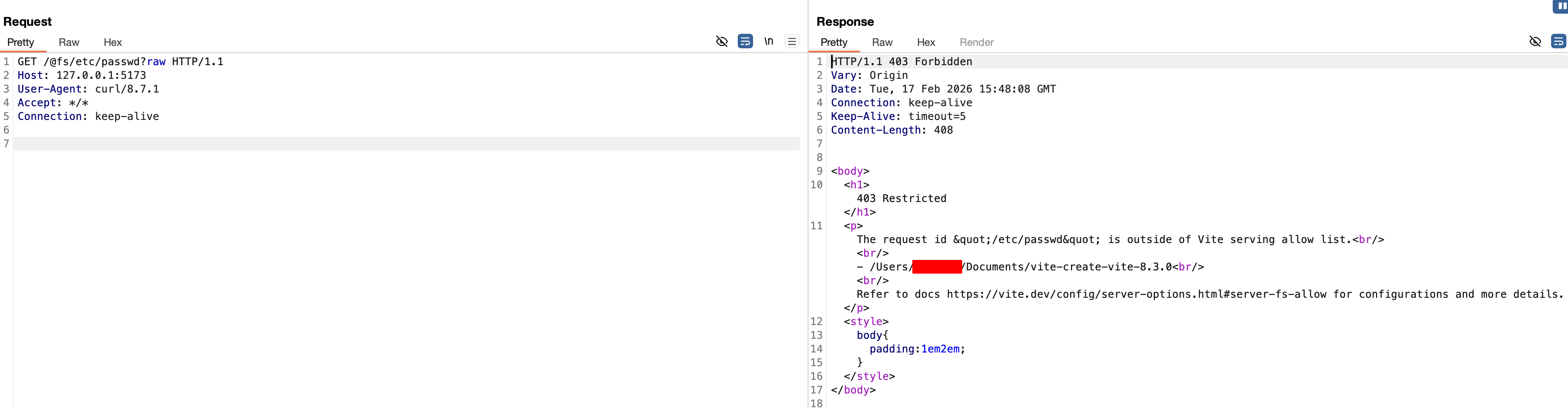
403 Restricted(outside the allow list)Confirm that the same file can be retrieved via the WebSocket path
By connecting to the HMR WebSocket without an
Originheader and sending avite:invokerequest that callsfetchModulewith afile://...URL and?raw, the file contents are returned as a JavaScript module.Severity
CVSS:4.0/AV:N/AC:L/AT:P/PR:N/UI:N/VC:H/VI:N/VA:N/SC:N/SI:N/SA:NReferences
This data is provided by the GitHub Advisory Database (CC-BY 4.0).
Vite Vulnerable to Path Traversal in Optimized Deps
.mapHandlingCVE-2026-39365 / GHSA-4w7w-66w2-5vf9
More information
Details
Summary
Any files ending with
.mapeven out side the project can be returned to the browser.Impact
Only apps that match the following conditions are affected:
--hostorserver.hostconfig option).mapand the path is predictableDetails
In Vite v7.3.1, the dev server’s handling of
.maprequests for optimized dependencies resolves file paths and callsreadFilewithout restricting../segments in the URL. As a result, it is possible to bypass theserver.fs.strictallow list and retrieve.mapfiles located outside the project root, provided they can be parsed as valid source map JSON.PoC
/@fsaccess is blocked bystrict(returns 403)../segments under the optimized deps.mapURL prefix to reach/tmp/poc.mapSeverity
CVSS:4.0/AV:N/AC:L/AT:P/PR:N/UI:N/VC:L/VI:N/VA:N/SC:N/SI:N/SA:NReferences
This data is provided by the GitHub Advisory Database (CC-BY 4.0).
vite:
server.fs.denybypass on Windows alternate pathsCVE-2026-53571 / GHSA-fx2h-pf6j-xcff
More information
Details
Summary
The contents of files that are specified by
server.fs.denycan be returned to the browser on Windows.Impact
Only apps that match the following conditions are affected:
--hostorserver.hostconfig option)server.fs.allowDetails
Vite’s dev server denies direct access to sensitive files through
server.fs.deny, including entries such as.env,.env.*, and*.{crt,pem}. However, on Windows, the deny logic does not correctly normalize NTFS ADS path forms before access checks are applied.Because of this, requests such as
/.env::$DATA?raware treated as allowed paths, while Windows resolves them to the original file's default data stream.Similar to that, Windows allows accessing a file using a different name with the 8.3 short name compatibility feature. Vite did not reject accessing files via them.
PoC
$ npm create vite@latest
$ cd vite-project/
$ npm install
$ npm run dev
Access via browser at
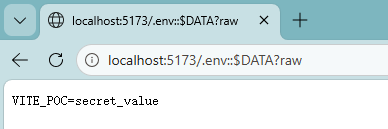
http://localhost:5173/.env::$DATA?rawExample expected result:
/.env::$DATA?rawreturns the contents of.env/tls.pem::$DATA?rawreturns the contents oftls.pemSeverity
CVSS:4.0/AV:N/AC:L/AT:P/PR:N/UI:N/VC:L/VI:N/VA:N/SC:H/SI:N/SA:NReferences
This data is provided by the GitHub Advisory Database (CC-BY 4.0).
launch-editor: NTLMv2 hash disclosure via UNC path handling on Windows
CVE-2026-53632 / GHSA-v6wh-96g9-6wx3
More information
Details
Summary
The
launch-editorNPM package accesses arbitrary paths including Windows UNC paths. When a UNC path is opened, Windows automatically attempts NTLM authentication to the remote host, causing the user’s NTLMv2 password hash to be leaked to an attacker-controlled SMB server. This can result in credential compromise through offline hash cracking.Impact
If the following conditions are met, an attacker can get the NTLMv2 password hash on the computer that is using the
launch-editor:launch-editorlaunch-editoris runningThis would be a problem if the user password is too simple that it can be identified through offline hash cracking, potentially leading to further compromise of developer accounts or internal systems.
Details
launch-editoraccepts file paths without validating or restricting Windows UNC paths such as:On Windows systems, accessing a UNC path triggers an automatic NTLM authentication attempt to the remote SMB server. No user interaction or warning is required for this authentication attempt to occur.
If an attacker controls the SMB server referenced by the UNC path the victim’s NTLMv2 hash is transmitted to the attacker. The attacker can then capture the hash and perform offline password cracking. Successful cracking reveals the victim’s cleartext password.
The attacker could target a developer that uses a development server using
launch-editorto develop code locally, send them a link and grab their NTLMv2 hash.PoC
From the attacker side, we will setup an SMB server. I personally used Impacket's smbserver.py, but you could use something like Responder for this as well. For keeping it simple, we will use
smbserver.pyhere.First, let's create a directory to serve as an SMB share.
Then, start the SMB server.
Now, run any project that uses the launch-editor package. I have setup a simple "Hello world" project that uses Vite to do this. Then run the project locally (
vite).Now last, we will open a browser window and navigate to the URL used by the launch-editor package to trigger the NTLM authentication. Or we can use
curlto achieve the same.Note the IP address in the HTTP request, and make sure it connects to the IP address of the SMB server. Now we can look at the logs of
smbserver.pyand see the NTLMv2 hash coming in.Severity
CVSS:4.0/AV:N/AC:H/AT:N/PR:N/UI:A/VC:N/VI:N/VA:N/SC:H/SI:H/SA:HReferences
This data is provided by the GitHub Advisory Database (CC-BY 4.0).
launch-editor: escapeCmdArgs() omits % escaping on Windows
CVE-2026-112943 / GHSA-698v-4r3x-3vcv
More information
Details
Summary
launch-editordid not escape%on Windows when passing an argument tocmd. When an environment variable contained a malicious value, it was possible that that content to be executed.Impact
Only apps that match all of the following conditions are affected:
&or%Details
Unlike
.shfiles,.bat/.cmdfiles on Windows cannot be called directly usingchild_process.spawnand requires passing them as an argument ofcmd.exe. To do so, launch-editor escapes the arguments passed tocmd.exe. Butlaunch-editordid not escape%which is used for environment variables.Because
launch-editorchecks if the argument matches an existing filename, the attack requires the attacker to be able to place a file.&calc.exeto%ENV%) and calllaunchEditorwithsomething%ENV%.~-38%calc.exe), they can calllaunchEditorwithsomething %CMDCMDLINE:~-38%calc.exe.%CD%and the subcommand (e.g.&calc.exe), they can calllaunchEditorwith./%CD%Severity
CVSS:4.0/AV:N/AC:L/AT:P/PR:N/UI:N/VC:L/VI:L/VA:L/SC:N/SI:N/SA:NReferences
This data is provided by the GitHub Advisory Database (CC-BY 4.0).
launch-editor:
fs.existsSync()existence check can be bypassed on WindowsCVE-2026-112942 / GHSA-587h-7wmj-h5pm
More information
Details
Summary
launch-editorcheckedfs.existsSync(fileName)before passing a supplied path to an editor command. On Windows, an attacker can bypass this check with a crafted path ending in\\..:line:column. This removes the requirement that the attacker be able to place a file with a malicious filename.Combined with the
%escaping issue described in GHSA-698v-4r3x-3vcv, this bypass can lead to OS command injection when an attacker controls the file argument.Impact
Only apps that runs on Windows is affected.
Details
The earlier advisory assumed that
fs.existsSync()required an attacker-controlled filename to exist. This advisory covers a bypass of that requirement.A crafted value ending in
\\..:1:1is interpreted differently bylaunch-editor-middleware,launch-editor, and Windows:launch-editor-middlewarecallspath.resolve()while the final path component is..:1:1, so it is not treated as a parent-directory component.launch-editortreats:1:1as a line-and-column suffix and removes it, leaving a path ending in\\...fs.existsSync()accepts the resulting path as the existing parent directory even though the attacker-controlled preceding component does not exist.Severity
CVSS:4.0/AV:N/AC:L/AT:P/PR:N/UI:A/VC:H/VI:H/VA:H/SC:N/SI:N/SA:NReferences
This data is provided by the GitHub Advisory Database (CC-BY 4.0).
launch-editor: Editor CLI flag misinterpretation causing arbitrary command execution for some editors
CVE-2026-112944 / GHSA-r825-w8mm-5pxw
More information
Details
Summary
launch-editorforwarded file paths directly to editors without sanitization. If a path resembles a CLI flag, editors like Vim may interpret it as a command, potentially causing unintended file overwrites or command execution.Impact
Direct
launch-editorusersOnly apps that match all of the following conditions are affected:
+or-in the working directorylaunchEditorcan start with+or-or the user is using WSLlaunch-editor-middlewareusersOnly apps that match the following conditions are affected:
+or-in the working directoryVite users
Only apps that match the following conditions are affected:
+or-in the working directoryDetails
launchEditor(file)function passes the file name as-is to the editor if the file with that file name exists. If the file name starts with-(also+for Vim), the editor treats them as flags rather than positional arguments. For example, Vim treats arguments starting with+as an Ex command. As a result, an existing relative directory such as:is not treated as a filename when passed to Vim. Vim executes the embedded Ex command.
The following editor has a potentially destructive operation exposed to the CLI arguments:
launch-editor-middlewarev2.2.0+ converts the passed file path to an absolute path so those are not affected as long as the user is not using WSL. For WSL,launch-editorconverts the paths to relative paths internally, so those are still affected.Vite 2.0.0+ uses
launch-editor-middlewarev2.2.0+ so the WSL users are only affected.Severity
CVSS:4.0/AV:N/AC:L/AT:P/PR:N/UI:N/VC:L/VI:L/VA:L/SC:N/SI:N/SA:NReferences
This data is provided by the GitHub Advisory Database (CC-BY 4.0).
Vite: Files outside
server.fs.allowcould be served when project paths match system paths on non-Windows machineCVE-2026-112946 / GHSA-rq7h-c2jc-7f22
More information
Details
Summary
The content of files outside
server.fssetting can be returned to the browser if the project imports a file path concatenated with theroot. For example, if the project references<path-to-project-root>/etc/hosts, the content of/etc/hostswas possible to be returned.The content of files outside the
server.fs.allowoption can be returned to the browser when a project imports a file whose root-relative path matches an absolute path on the host. For example, referencing<project-root>/etc/hostscould make Vite return the host's/etc/hostsfile.Impact
Only apps that meet all of the following conditions are affected:
--hostor theserver.hostoption)server.fs.denyDetails
When Vite analyzes an in-root import, it rewrites the resolved module ID to a browser URL such as
/etc/hostname. In affected versions, Vite converts that URL withfsPathFromUrland adds the result tosafeModulePaths. BecausefsPathFromUrlensures a leading slash without resolving the URL against the project root, the project URL/etc/hostnameis recorded as if it were the absolute filesystem path/etc/hostname.For a later request to
/@fs/etc/hostname, the raw-filesystem middleware interprets/etc/hostnameas an absolute path. The access check appliesserver.fs.deny, then accepts paths present insafeModulePathsbefore checkingserver.fs.allow. As a result, the request can return the host file instead of the project file that originally populatedsafeModulePaths.PoC
The following example requires Linux with a readable
/etc/hostname:In another terminal:
Severity
CVSS:4.0/AV:N/AC:L/AT:P/PR:N/UI:N/VC:L/VI:N/VA:N/SC:N/SI:N/SA:NReferences
This data is provided by the GitHub Advisory Database (CC-BY 4.0).
Vite: Cross origin script execution through Vite custom middleware
CVE-2026-112945 / GHSA-9jrq-w75r-8gcw
More information
Details
Summary
When accessing a malicious site while a dev server using Vite is running, that site was able to load scripts in a page served by the dev server.
Impact
Only apps that match the following conditions are affected:
server.transformIndexHtml: this is normally used forserver.middlewareMode: trueorappType: 'custom'. The internal call forappType: 'spa'andappType: 'mpa'does not match this.Details
Vite's SSR guide for 8.2.1 documents the affected setup. The application embeds Vite in middleware mode, reads trusted HTML, and passes the browser's unchanged request URL to the transform:
For a development server at
http://localhost:5173, an attacker can send this URL:In Vite 8.2.1,
createDevHtmlTransformFnandgetHtmlFilenameinindexHtml.tsuse the request URL as both the transformpathand the input topath.join. The value passed topath.joinstill includes its query text.Chromium preserves
/../../package.jsonbecause it follows?and is therefore query text. Vite treats the same characters as filesystem path components, so the..components resolve the derived filename to the existing projectpackage.json.The existing file branch in
indexHtml.tschecks that filename withfs.existsSync, then preserves thehtmlPathsupplied by the attacker asproxyModuleUrl. The inline module rewrite in the same file writes that value into the generatedsrc:The generated value is a valid URL. Its leading
//tells the browser to request the module fromevil.exampleusing the Vite page's scheme. The attacker returns JavaScript for that request, and Chromium executes it in the Vite page.PoC